Created Mittwoch 02 April 2025
- AROS dev: Extend lh_startaros.sh to restore/save AROS prefs. !!!
Setup
This setups a Linux hosted x86 64 bit AROS.
Create/compile
To start first Linux-hosted AROS x86 64 bit build start again:
$ ./AROS/scripts/rebuild.sh
Choose 2) core-linux-x86_64 (DEBUG).
Creates content in aros/arosbuilds/core-linux-x86_64-d.
First start
Once the operation is complete, AROS is already installed. You can run it by executing the AROSBootstrap file. But no network at this moment.
$ cd core-linux-x86_64-d/bin/linux-x86_64/AROS
$ ./boot/linux/AROSBootstrap
Shutdown wsl
Because networking (routing) didn't work correctly I shutdown WSL which worked. Could have been a one time thing but just to be sure. Exit the Ubuntu console and execute the command on Powershell or CMD (Does not need admin):
$ wsl --shutdown
Create a startup script
To have an easier way to start up AROS create the following script ~/development/aros/scripts/lh_startaros.sh:
WSL 2 Ubuntu 24.04: # apt install iptables
#!/bin/bash

# Check if the network interface aros0 exists
if ! ip link show aros0 &>/dev/null; then
    echo "Installing bridge network... (sudo access required)"

    # Create a TAP interface with standard Ubuntu command
    sudo ip tuntap add dev aros0 mode tap user "$USER"

    # Assign an IP address to the TAP interface
    sudo ip addr add 192.168.166.1/24 dev aros0
    sudo ip link set aros0 up

    # Enable NAT for both eth0 and wlan0
    sudo iptables -t nat -A POSTROUTING -o eth0 -s 192.168.166.0/24 -j MASQUERADE
    sudo iptables -t nat -A POSTROUTING -o wlan0 -s 192.168.166.0/24 -j MASQUERADE

    # Enable IP forwarding
    echo 1 | sudo tee /proc/sys/net/ipv4/ip_forward
fi

# Navigate to the project directory and start AROS
cd ~/development/arosbuilds/core-linux-x86_64-d/bin/linux-x86_64/AROS || exit
./boot/linux/AROSBootstrap -m 1024
This script gives AROS a TAP as network card and routes the traffic into the LAN/Internet and starts AROS.
Set execution bit:
$ chmod 755 ~/development/aros/scripts/lh_startaros.sh
Add ${HOME}/development/aros/scripts to the path in ~/.bashrc:
export PATH=$PATH:~/development/aros/scripts
Execute the command above also in the console or restart/relogin to the console or execute . ~/.bashrc.
Start AROS with:
$ lh_startaros.sh
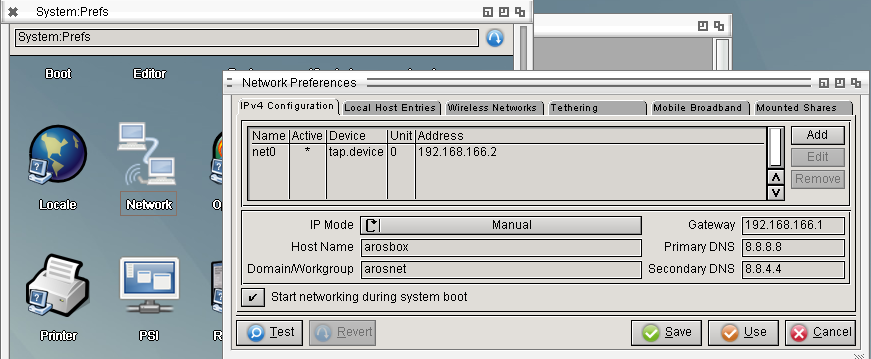
In AROS open Prefs/Network, select the tap.device interface and manually set the IP addresses as in the following screenshot:
Prepare cross compiler
This creates a shortcut to directly run the AROS cross compiler to create AROS binaries.
Create a script x86_64-aros-gcc in ~/development/aros/arosbuilds/scripts:
exec ${HOME}/development/aros/arosbuilds/toolchain-core-x86_64/x86_64-aros-gcc --sysroot=${HOME}/development/aros/arosbuilds/core-linux-x86_64-d/bin/linux-x86_64/AROS/Development "$@"
-> We can't use the ~ as home directory replacement because it doesn't get expanded correctly with sysroot.
Set execution bit:
$ chmod 755 ~/development/aros/arosbuilds/cross-x86_64-aros/x86_64-aros-gcc